

Print shop quoting software is an automated platform that converts job specifications into structured, accurate price estimates using pre-configured pricing rules, replacing manual spreadsheet calculations. Solutions like Printavo, OnPrintShop, and Printlogic generate quotes in minutes rather than hours, cutting administrative time and protecting profit margins. The core value is not just speed. It is consistency: every quote follows the same pricing logic, regardless of who builds it. For print shop owners managing high job volumes across digital, offset, or wide-format production, that consistency is the difference between predictable margins and constant revenue leakage.
What is print shop quoting software and how does it work?
Print shop quoting software, also called print estimating software or print MIS (Management Information System) quoting, takes job inputs and applies stored pricing logic to produce a structured estimate. Inputs typically include quantity, substrate, ink coverage, finishing options, and turnaround time. The software calculates costs by factoring in machine speeds, labor rates, makeready times, and material costs automatically.
These systems support multiple pricing models including fixed price, tiered quantity breaks, and variable cost-based pricing, generating quotes in minutes rather than hours. That speed matters when a customer is waiting on a same-day turnaround decision.

The workflow integration is where quoting software earns its keep. Once a customer accepts an estimate, the system converts it directly into a digital job bag or work order. Accepted estimates convert automatically into job records that production teams use directly, eliminating the need to re-key data and reducing production errors. This handoff is the most error-prone step in manual workflows, and software eliminates it entirely.
Key functional components include:
- Job specification inputs: Quantity, paper stock, ink type, finishing (lamination, binding, cutting), and delivery requirements
- Pricing rule engine: Pre-built formulas applying machine overhead, labor rates, and material costs per production type
- Quote generation: Formatted customer-facing estimates with line-item breakdowns
- Quote-to-job conversion: Automatic transfer of accepted quotes into production job records
- Revision tracking: Version control on quotes to manage client change requests without losing original pricing
Pro Tip: Configure your pricing rules before going live with any quoting platform. Shops that skip this step automate incorrect logic and compound pricing errors at scale.
Types of print shop quoting software and common pricing models
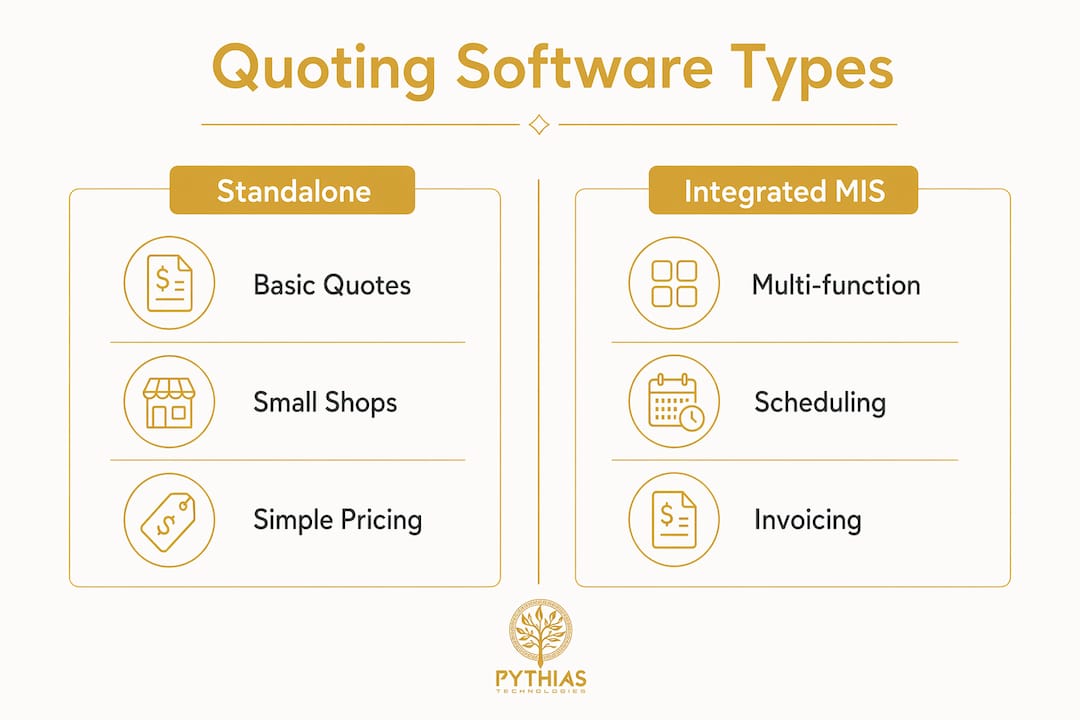
Print estimating tools range from standalone quoting apps to fully integrated print MIS platforms. Understanding the difference helps you match software capability to your actual operation size and complexity.
Standalone estimating tools focus exclusively on quote generation. They work well for smaller shops with simple product catalogs and limited production types. Setup is faster, but they require manual data transfer to production systems.
Template-driven quoting platforms use pre-built product templates (business cards, flyers, banners) with locked pricing structures. Shops configure rates once and the system applies them consistently. OnPrintShop operates on this model, making it practical for shops with standardized product lines.
Integrated print MIS platforms combine quoting with scheduling, inventory, invoicing, and production tracking in one system. Printlogic, for example, provides five quote generation methods including full machine-based cost calculation factoring press speeds, paper, and finishing rates. Estimates convert to jobs with full detail transfer, eliminating manual re-entry. These platforms suit mid-to-large shops running multiple production types simultaneously.
The table below summarizes the main categories:
| Software type | Key features | Best for |
|---|---|---|
| Standalone estimating app | Quote generation, basic templates | Small shops, single production type |
| Template-driven platform | Pre-built product templates, locked pricing | Shops with standardized catalogs |
| Integrated print MIS | Quoting, scheduling, invoicing, inventory | Mid-to-large shops, multi-process |
| Web-to-print with quoting | Online ordering, customer self-quoting | E-commerce-focused print businesses |
Modern quoting software supports diverse production types including digital, offset, wide-format, and brokerage with granular costing that incorporates machine speeds and labor rates. That granularity means a platform can price a run of 500 business cards and a 10-foot trade show banner using the same system, each with accurate, production-specific cost logic.
One underused feature worth noting: tiered and outsource-aware quoting logic lets software automatically compare in-house production costs against external trade printer pricing. This improves profitability by selecting the best production option dynamically, which is particularly valuable for shops that broker specialty work.
Benefits of automating quoting with integrated print software platforms
Automating your quoting process with integrated print shop software delivers measurable gains across pricing consistency, cost control, and production throughput. The benefits compound when quoting connects directly to the rest of your operation.
-
Consistent pricing across all staff. Automated quoting protects margins by standardizing pricing logic across all salespeople, eliminating quote inconsistency. One salesperson quoting a job at cost-plus-20% while another quotes at cost-plus-10% is a margin problem that software solves permanently.
-
Faster quote turnaround. Quotes that previously took 30 to 60 minutes to build manually generate in under five minutes with a configured system. That speed lets your team handle more quote requests without adding headcount.
-
Reduced data entry errors. The most successful systems act as a single source of truth where quotes flow directly into production without manual data re-entry, carrying client details, pricing, and specifications into job records automatically. Every manual transfer is a potential error. Removing it removes the risk.
-
Improved margin visibility. When pricing rules include accurate machine overhead, labor, and material costs, every quote reflects real production cost. Managers can see margin per job before accepting it, not after invoicing.
-
Scalable quoting capacity. A shop running 50 jobs per week can handle 150 with the same team when quoting is automated. The bottleneck shifts from quote preparation to production capacity, which is a far better problem to have.
Pro Tip: Connect your quoting software to your print queue management system from day one. Quotes that feed directly into the production queue eliminate the scheduling gaps that cause missed deadlines.
Printavo takes this integration further by linking estimates to live job visibility and status updates, centralizing quoting, production input, and revisions in one system. This reduces the gaps between what sales promises and what production delivers.
How to choose the best print shop quoting software for your business
Choosing the right print shop estimating tools requires matching software capabilities to your specific production environment, team size, and growth plans. A platform that works for a two-person digital print shop will not serve a 20-person shop running offset, DTG, and wide-format simultaneously.
Evaluate software against these criteria before committing:
-
Pre-built templates and pricing engines. Rapid onboarding with pre-built templates accelerates value by minimizing setup time. Prioritize platforms that ship with standard product templates for your most common job types. Building every template from scratch adds weeks to your go-live timeline.
-
Integration depth. The software must connect to your inventory, scheduling, production tracking, and invoicing systems. Quoting software that operates in isolation creates the same data silos you were trying to eliminate. Check whether the platform integrates with your existing equipment, such as Brother GTX printers for DTG, or your e-commerce channels on Shopify or Etsy.
-
Support for your production types. Confirm the platform handles every print process you run: digital, offset, wide-format, embroidery, DTF, or brokerage. A system that cannot price your full product range forces you to maintain parallel quoting methods.
-
Scalability for multi-channel production. If you sell through multiple marketplaces or plan to add outsourced production, verify the software supports outsource-aware quoting and multi-channel order intake. This is especially relevant for shops expanding into print-on-demand fulfillment.
-
User experience and onboarding support. A platform your team will not use consistently delivers no value. Evaluate the interface during a trial period with actual staff. Ask vendors about their onboarding timeline. Platforms with structured onboarding programs, ideally under two weeks, reduce the adoption risk significantly.
-
Total cost and ROI timeline. Factor in subscription fees, setup costs, and training time against the hours saved per week on manual quoting. Most shops with 20 or more jobs per week recover software costs within the first quarter.
For shops managing garment printing operations, the integration between quoting, inventory, and production scheduling is particularly critical. A missed SKU or incorrect substrate cost in a quote can erase the margin on an entire order run.
My take: quoting software is a workflow foundation, not a calculator
The most common mistake I see print shop owners make with quoting software is treating it as a standalone pricing tool. They configure it, use it to generate estimates, and stop there. The software sits disconnected from inventory, scheduling, and invoicing. The result is a faster calculator that still requires manual data transfer at every handoff.
Quoting software must integrate with inventory, scheduling, and invoicing workflows to prevent silos. That is not a feature preference. It is the operational requirement that determines whether the software pays for itself.
The second pitfall is under-configuring pricing rules at setup. Under-configuring pricing rules causes continuous inaccurate estimates because the software automates incorrect logic consistently. Shops that rush setup to get live faster end up with quotes that systematically undercharge on makeready time or miss machine overhead entirely. Fix the logic before you process a single real quote.
My practical advice: spend the first two weeks of any new platform implementation on pricing rule configuration and template building. Do not accept the first quote the system generates as accurate. Run it against your actual job cost records and adjust until the numbers match reality. That upfront investment in configuration accuracy is what separates shops that gain margin control from those that automate their existing pricing problems.
Ongoing evaluation matters too. Review your quoting accuracy quarterly by comparing estimated costs to actual job costs. The gap between those two numbers tells you exactly where your pricing rules need adjustment.
— Michael
How Pythias Technologies supports your print shop workflow
Pythias Technologies offers a print-on-demand automation platform built for shops that need quoting, order management, and fulfillment to operate as one connected system. The platform integrates with major marketplaces including Amazon, Etsy, and Shopify, and connects directly with printing equipment like Brother GTX printers. Features include real-time inventory management, automated label generation, and batch processing across multiple sales channels. Pythias helps shops automate production and fulfillment so they can grow revenue and ship faster. Onboarding takes under two weeks. Explore the full platform capabilities to see how Pythias Technologies connects quoting and production into one efficient workflow.
Key takeaways
Print shop quoting software delivers full value only when it connects quoting directly to production, inventory, and invoicing as one integrated workflow rather than operating as a standalone pricing calculator.
| Point | Details |
|---|---|
| Core definition | Quoting software converts job specs into structured estimates using pre-configured pricing rules. |
| Workflow integration | Accepted quotes must auto-convert to job records to eliminate manual re-entry errors. |
| Pricing consistency | Locking pricing logic across all staff protects margins from quote-to-quote variation. |
| Configuration accuracy | Accurate machine overhead and labor inputs are required before processing live quotes. |
| Selection criteria | Match software to your production types, integration needs, and onboarding timeline. |
FAQ
What does print shop quoting software do?
Print shop quoting software converts job inputs such as quantity, substrate, and finishing into structured price estimates using pre-built pricing rules. It replaces manual spreadsheet calculations and can generate quotes in minutes rather than hours.
How does quoting software connect to production?
When a customer accepts a quote, the software automatically converts it into a digital job bag or work order with all specifications and pricing carried over. This eliminates manual data re-entry and reduces production errors at the handoff stage.
What pricing models do these platforms support?
Most print estimating tools support fixed pricing, tiered quantity breaks, and variable cost-based pricing. Advanced platforms also include outsource-aware logic that compares in-house production costs against trade printer rates to select the most profitable option.
How do I choose the right quoting software for my shop?
Prioritize platforms with pre-built templates for your most common job types, integration with your existing inventory and scheduling systems, and support for every production process you run. Confirm the onboarding timeline fits your operational capacity before committing.
Can quoting software work for DTG and wide-format printing?
Yes. Modern print shop software supports diverse production environments including DTG, wide-format, offset, and embroidery, with granular costing that accounts for machine speeds, labor rates, and material costs specific to each process.
Recommended
- Print Shop Capacity Planning: What Managers Must Know | Pythias Technologies
- How Production Reporting Works in Print Shops | Pythias Technologies
- Garment Print Shop Software Setup: 2026 Guide | Pythias Technologies
- Garment Printer Software Checklist for Print Pros | Pythias Technologies | Pythias Technologies